Application security risks, types of vulnerable applications, and OWASP Top 10 vulnerabilities. Each answer below is structured for 10-mark depth.
Definition
Application security is critical across all software types as attackers increasingly target apps to exploit sensitive user data, disrupt services, or gain unauthorized access.
Types of Applications Requiring Security
- Web Applications: Accessible via browsers and are high-risk targets. Common threats include SQL Injection (SQLi), Cross-Site Scripting (XSS), and session hijacking. Because they are publicly accessible, they represent the largest attack surface.
- Mobile Applications: Run on Android/iOS devices and require protection for locally stored data, secure API communication, and prevention of reverse engineering or tampering of the APK/IPA binary.
- Cloud Applications: Includes SaaS, PaaS, and IaaS platforms. Security concerns include misconfigured storage buckets, improper access controls, and insecure data transmission between cloud services.
- API-Driven Applications: APIs enable communication between different systems. They are critical targets for data interception and unauthorized access if not properly authenticated and rate-limited.
- Containerized Applications: Applications running in Kubernetes or Docker environments. They need protection against container escape vulnerabilities, image tampering, and misconfigured container permissions.
- IoT (Internet of Things) Applications: Software that controls smart devices (cameras, sensors, smart home equipment). Often lacks robust security, making them vulnerable to malware and botnet recruitment.
- Desktop Applications: Software installed directly on endpoints. May handle sensitive user data and can be vulnerable to local privilege escalation, insecure storage, and reverse engineering.
Definition
OWASP Top 10 — Official Mapping Diagram
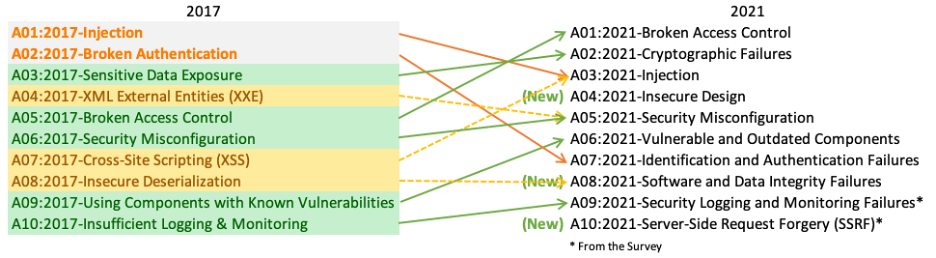
OWASP Top 10 Application Security Risks
| # | Risk | Description | Example |
|---|---|---|---|
| 1 | Broken Access Control | Restrictions on authenticated users are improperly enforced, allowing attackers to access unauthorized functionality or data. | A normal user accessing admin pages by modifying the URL. |
| 2 | Cryptographic Failures | Inadequate protection of sensitive data (financial, PII) due to weak encryption or poor key management. | Storing passwords in plain text or using MD5 hashing. |
| 3 | Injection Flaws | Untrusted data is sent to an interpreter as a command. Includes SQL, NoSQL, OS, LDAP injections. | SQL Injection: ' OR '1'='1 bypasses login. |
| 4 | Insecure Design | Flaws in the application's architecture that cannot be fixed by implementation alone — requires secure design from the start. | No rate-limiting on password reset, allowing brute force. |
| 5 | Security Misconfiguration | Insecure default configurations, open cloud storage, misconfigured HTTP headers, or unnecessary features enabled. | Default admin credentials left unchanged on a server. |
| 6 | Vulnerable & Outdated Components | Using libraries, frameworks, or software components with known security weaknesses (unpatched CVEs). | Using an old version of OpenSSL with Heartbleed vulnerability. |
| 7 | Identification & Authentication Failures | Weaknesses that allow attackers to compromise passwords, keys, or session tokens to assume user identities. | No multi-factor authentication, allowing credential stuffing attacks. |
| 8 | Software & Data Integrity Failures | Code or infrastructure that does not protect against integrity violations, such as insecure CI/CD pipelines or untrusted update mechanisms. | Attacker injects malicious code into a software update. |
| 9 | Security Logging & Monitoring Failures | Insufficient detection, logging, and alerting that prevents timely response to breaches. | No logs of failed login attempts, so a brute-force attack goes undetected. |
| 10 | Server-Side Request Forgery (SSRF) | The application fetches a remote resource without validating the user-supplied URL, allowing attackers to target internal systems. | An attacker forces the server to access internal metadata service at 169.254.169.254. |
1. Injection Flaws
- SQL Injection (SQLi): Malicious SQL statements inserted into an input field.
Example: Login form input' OR '1'='1' --bypasses authentication by making the SQL query always true. - NoSQL Injection: Targets NoSQL databases like MongoDB using JSON-based payloads.
- OS Command Injection: Attacker runs system-level commands through the application.
- LDAP Injection: Manipulates LDAP queries to bypass authentication or access directory information.
Prevention: Use parameterized queries / prepared statements, input validation, and least-privilege database accounts.
2. Broken Access Control
- Horizontal Privilege Escalation: User A accesses User B's data by changing a URL parameter (e.g.,
/account?id=1002→/account?id=1003). - Vertical Privilege Escalation: A regular user accesses admin-only functionality by guessing or manipulating URLs.
- Insecure Direct Object Reference (IDOR): Application exposes internal implementation objects (file names, database keys) directly.
- Missing Function-Level Access Control: APIs don't enforce access controls on sensitive endpoints.
Prevention: Deny access by default, enforce access control server-side, log access violations, and regularly test access controls.
1. Cryptographic Failures
- Transmitting data in plain text (using HTTP instead of HTTPS).
- Using weak or deprecated cryptographic algorithms (MD5, SHA1, DES).
- Poor key management — hardcoded keys in source code.
- Not enforcing encryption at rest for sensitive database fields.
Prevention: Use strong algorithms (AES-256, RSA-2048), enforce HTTPS/TLS, store passwords using bcrypt/scrypt/Argon2, and properly manage encryption keys.
2. Security Misconfiguration
- Default credentials not changed (admin/admin).
- Unnecessary features, ports, services enabled.
- Verbose error messages revealing stack traces to users.
- Open S3 buckets in cloud environments exposing sensitive files.
- Missing security headers like Content-Security-Policy, HSTS.
Prevention: Harden configuration, disable unused features, automate configuration audits, and regularly review cloud resource permissions.
3. Server-Side Request Forgery (SSRF)
- Attacker provides URL pointing to internal services:
http://192.168.1.1/admin - Access cloud metadata services:
http://169.254.169.254/latest/meta-data/(common in AWS) - Can be used to scan internal networks, bypass firewalls, or access credentials.
Prevention: Validate and sanitize all client-supplied URLs, use allowlists for permitted domains, disable HTTP redirections, and enforce network segmentation.
Cyber Incident Response lifecycle, phases, planning steps, technologies, and strategies — structured for 10-mark exam answers.
Definition
A cyber incident may include events such as malware infections, ransomware attacks, phishing campaigns, data breaches, insider threats, or Distributed Denial-of-Service (DDoS) attacks.
Main Goal
To minimize damage, reduce recovery time and costs, protect organizational reputation, and prevent similar incidents from occurring in the future — following the NIST lifecycle model.
Common Types of Cyber Incidents
- Malware Attacks: Malicious software (viruses, trojans, ransomware, spyware) that disrupts, damages, or gains unauthorized access to systems.
- Phishing & Social Engineering: Deceptive emails or messages that trick users into revealing credentials or installing malware.
- Data Breaches: Unauthorized access to confidential data — customer records, financial info, intellectual property.
- DDoS (Distributed Denial of Service): Floods a server or network with traffic from multiple sources to make services unavailable.
- Insider Threats: Malicious or negligent actions by employees, contractors, or business partners with internal access.
- Unauthorized Access: An attacker gains access to systems, networks, or data without permission — often through stolen credentials.
Why Incident Response is Important
- Reduces financial losses from breaches, downtime, and regulatory fines.
- Protects organizational reputation by demonstrating control and responsibility.
- Ensures legal and regulatory compliance (GDPR, HIPAA, ISO 27001).
- Minimizes downtime and business disruption.
- Improves future security posture through lessons learned.
NIST Incident Response Lifecycle

Detailed Phase Breakdown
- Preparation: This is the most important phase. Develop an incident response policy, create playbooks for common threats (ransomware, phishing), define roles and responsibilities, train the CSIRT, and deploy SIEM/IDS tools.
- Identification: Monitor systems continuously. When an alert fires, analysts determine if it's a true positive incident — not just a false alarm. They analyze logs, network traffic, and user behavior to determine the scope and severity.
- Containment: Act quickly to prevent the incident from spreading. This may involve isolating affected machines from the network, blocking malicious IPs, or disabling compromised user accounts.
- Eradication: After containment, fully remove the threat. This includes deleting malware, patching the exploited vulnerability, resetting compromised credentials, and closing entry points.
- Recovery: Restore affected systems from clean backups and bring services back online in a controlled manner. Monitor closely for any signs of re-infection.
- Lessons Learned: After recovery, the team holds a review meeting to document what happened, how it was handled, what worked, and what needs improvement. The IR plan is updated accordingly.
Definition
10 Steps of Incident Response Planning
- Establish Objectives and Scope: Define what the plan aims to protect (data, systems, networks). Identify critical assets and business priorities. Determine which types of incidents are covered (malware, insider threats, DDoS, etc.).
- Develop an Incident Response Policy: Create a formal policy approved by senior management. Define authority levels and decision-making structure. Align with standards such as NIST SP 800-61 or ISO/IEC 27035.
- Form the Incident Response Team (IRT): Assign clear roles — Incident Manager, Security Analysts, IT Support, Legal & Compliance, Communication/PR. Define contact details and escalation paths for each role.
- Identify Critical Assets and Risks: Conduct risk assessments to identify vulnerabilities and potential threats. Prioritize systems based on their impact and sensitivity to the organization.
- Develop Response Procedures and Playbooks: Create step-by-step procedures for common incident types (ransomware, phishing, data breach). Include containment, eradication, and recovery instructions. Define evidence handling procedures (chain of custody for forensics).
- Implement Detection and Monitoring Tools: Deploy SIEM systems, Intrusion Detection Systems (IDS), and Endpoint Detection & Response (EDR). Set up alert mechanisms and define logging policies.
- Establish a Communication Plan: Define internal communication channels. Prepare notification templates for management, employees, customers, and regulatory authorities. Plan for media handling if a major breach occurs.
- Training and Awareness: Conduct regular employee security training. Perform incident response drills and tabletop simulations to test team readiness.
- Testing and Review: Perform tabletop exercises and penetration testing. Identify gaps in the existing plan and update it regularly.
- Plan Maintenance and Continuous Improvement: Review the plan after every incident. Update based on lessons learned. Adapt to new threats and evolving technologies.
Definition
Key Technologies
| Technology | Full Form | Function | Best For |
|---|---|---|---|
| SIEM | Security Information and Event Management | Collects and correlates logs and security data from across systems. Helps teams spot real threats and reduce alert noise. | Early threat detection and centralized analysis. |
| SOAR | Security Orchestration, Automation, and Response | Automates repetitive response tasks and integrates multiple security tools. Defines automated playbooks for known incident types. | Reducing analyst workload, faster automated response. |
| EDR | Endpoint Detection and Response | Monitors and protects individual devices against threats that bypass traditional antivirus. Collects endpoint telemetry and can quarantine infected systems. | Device-level threat detection and isolation. |
| XDR | Extended Detection and Response | Expands detection across endpoints, networks, cloud, and other sources in a unified system. Detects complex multi-vector threat patterns. | Unified visibility and cross-environment response. |
| UEBA | User and Entity Behavior Analytics | Uses machine learning to identify abnormal behavior by users or devices that may indicate insider threats or compromised accounts. | Detecting insider threats and account compromise. |
| IDS/IPS | Intrusion Detection/Prevention Systems | IDS monitors network traffic for suspicious patterns and generates alerts. IPS actively blocks suspicious traffic in real-time. | Network-level threat monitoring and blocking. |
Importance of These Technologies
- Faster Detection: Helps catch threats before they spread widely across the network.
- Automated Responses: Reduces manual analyst workload and speeds up mitigation actions through automation.
- Better Coordination: Provides responders with contextual insights and unified views of attacks across the entire environment.
Definition
Key Phases of an IR Strategy
- Preparation: Develop policies, identify critical assets, train the CSIRT, and set up tools for detection and analysis. This phase creates the foundation for all subsequent phases.
- Detection and Analysis: Continuously monitor systems to identify potential security incidents. Determine the incident's scope and severity. Classify the type of attack.
- Containment, Eradication, and Recovery: Isolate affected systems to prevent spread, eliminate the threat (malware/attacker presence), restore services safely from clean backups.
- Post-Incident Activity: Document everything, conduct a "lessons learned" review with all stakeholders, and update the strategy to improve future responses.
Essential Elements for a Successful IR Strategy
- Defined Roles: Clearly identify who is responsible for declaring an incident, managing communications, executing technical tasks, and legal obligations. Without defined roles, response becomes chaotic.
- Incident Playbooks: Specific, step-by-step instructions for common scenarios like ransomware attacks, phishing incidents, insider threats, or data breaches. Playbooks eliminate guesswork under pressure.
- Communication Plan: Establish secure, out-of-band communication channels for the IR team. Regular corporate email may be compromised during an incident. Include templates for notifying management, staff, customers, and regulators.
- Documentation: Keep a detailed incident log tracking all actions taken. This is critical for legal and forensic purposes, regulatory compliance reporting, and future improvement.
- Regular Training: Conduct tabletop exercises to simulate real incidents and test the plan. Ensures team members know their roles and can act confidently without referring to documentation every step.
API Security Risks, Application Security Testing, Best Practices, CIR Overview, IR Essentials & 5 Stages, IR Planning, IR Technologies, IR Strategy, and a Case Study.
Definition

OWASP API Security Top 10 — Explained
| # | Risk | Description & Example |
|---|---|---|
| API1 | Broken Object Level Auth (BOLA) | APIs expose object IDs; attacker changes ID in request to access another user's data. Ex: GET /orders/1001 → change to /orders/1002 to see another user's order. |
| API2 | Broken Authentication | Weak/missing auth mechanisms. No token expiry, no brute-force protection, weak JWT secrets. Ex: Reusing expired session tokens to access protected endpoints. |
| API3 | Broken Object Property Level Auth | API returns more data than needed (over-exposure) or allows mass assignment attacks. Ex: PUT /user with extra field {"role":"admin"} is accepted without validation. |
| API4 | Unrestricted Resource Consumption | No rate limiting on API — attacker sends thousands of requests, causing DoS or high cloud costs. Ex: SMS verification API spammed to charge the company per-message. |
| API5 | Broken Function Level Auth | Regular users can access admin-only API functions by guessing endpoints. Ex: POST /api/admin/delete accessible without admin role check. |
| API6 | Unrestricted Access to Sensitive Flows | Automated bots abusing legitimate business flows (bulk buying, account takeovers). |
| API7 | Server-Side Request Forgery | API fetches URLs from user input without validation, accessing internal services. |
| API8 | Security Misconfiguration | Default credentials, CORS wildcard, verbose error messages, unnecessary HTTP methods enabled. |
| API9 | Improper Inventory Management | Old/deprecated API versions still running with known vulnerabilities. Ex: v1 of API still accessible with old vulnerable authentication logic. |
| API10 | Unsafe Consumption of APIs | Trusting data from third-party APIs without validation, leading to injection or other attacks. |
Definition

Types of Application Security Testing
| Type | Full Form | How It Works | Phase | Finds |
|---|---|---|---|---|
| SAST | Static Application Security Testing | Analyzes source code, bytecode, or binaries without executing the application. Scans for patterns matching known vulnerabilities. Also called "white-box testing". | Early — during development. Can be integrated into IDEs and CI/CD. | SQL injection patterns, hardcoded credentials, buffer overflows, insecure function calls. |
| DAST | Dynamic Application Security Testing | Tests the running application from the outside — simulates an attacker sending malformed inputs and analyzing responses. Also called "black-box testing". | Testing/staging phase, on a running application. | XSS, SQLi, authentication flaws, runtime issues, misconfigurations. |
| IAST | Interactive Application Security Testing | Combines SAST and DAST — uses agents/sensors deployed inside the running application to monitor it from within during testing. Provides real-time vulnerability data with very low false positives. | QA and functional testing phase. | Runtime issues + code-level context. Very accurate. |
| SCA | Software Composition Analysis | Identifies open-source libraries and third-party components used in the application and checks them against known vulnerability databases (CVE/NVD). | Continuous — all SDLC phases. | Known CVEs in dependencies, license compliance issues. |
| Penetration Testing | Manual / Automated | Security experts simulate real-world attacks on the application manually. More thorough and creative than automated tools — finds logic flaws and chained vulnerabilities. | Pre-release, compliance audits, periodic security reviews. | Business logic flaws, chained exploits, privilege escalation, complex auth bypasses. |
| RASP | Runtime Application Self-Protection | Security technology built directly into the application runtime. Detects and blocks attacks in real-time by intercepting application calls and comparing behavior to a security model. | Production — acts as last line of defense. | Zero-day exploits, injection attacks, unexpected file access patterns. |
SAST vs DAST — Quick Comparison
| Aspect | SAST (White-Box) | DAST (Black-Box) |
|---|---|---|
| Code access needed? | Yes — analyzes source code | No — tests running app |
| Phase | Early (development) | Late (testing/staging) |
| False positives | High | Low |
| Finds | Code-level flaws | Runtime/network flaws |
Definition
10 Key Best Practices
- Secure by Design (Shift-Left Security): Security must be considered from the very beginning of development, not as an afterthought. Conduct threat modeling during design. Follow the Security Development Lifecycle (SDL). Use STRIDE to identify threats early.
- Input Validation and Output Encoding: Never trust user-supplied input. Validate all inputs against expected type, length, format, and range. Encode output to prevent XSS. Use parameterized queries to prevent SQL injection.
- Strong Authentication and MFA: Enforce strong password policies. Implement Multi-Factor Authentication (MFA) for all critical systems. Use secure session management — generate new session IDs after login, set proper expiry, invalidate on logout.
- Principle of Least Privilege: Every user, process, and component should have the minimum permissions necessary to perform its function. Restricts the blast radius if an account is compromised. Apply to database users, API keys, service accounts, and cloud IAM roles.
- Encryption at Rest and in Transit: All sensitive data must be encrypted when stored (AES-256) and when transmitted (TLS 1.2+). Never use deprecated algorithms (MD5, SHA1, DES). Hash passwords with bcrypt, scrypt, or Argon2.
- Patch Management and Dependency Updates: Continuously monitor third-party libraries for known vulnerabilities (CVEs) using SCA tools. Apply security patches promptly. Maintain a Software Bill of Materials (SBOM). Remove unused/outdated dependencies.
- Regular Security Testing: Integrate SAST in CI/CD pipelines. Perform DAST on staging environments. Conduct periodic penetration tests. Run vulnerability assessments before major releases.
- Security Logging and Monitoring: Log all authentication events, API calls, errors, and administrative actions. Monitor logs in real-time using SIEM. Set up alerts for anomalous activity. Retain logs for compliance and forensic purposes.
- Secure Software Development Lifecycle (S-SDLC): Embed security checkpoints at every SDLC phase — requirements, design, implementation, testing, deployment, maintenance. Train all developers in secure coding practices. Conduct security code reviews.
- Error Handling and Information Disclosure Prevention: Never expose stack traces, database errors, or internal paths to end users. Use generic error messages for users. Log detailed errors securely server-side. Disable debug mode in production.
Definition

Key Fundamentals of CIR
- Structured Approach: CIR follows a documented lifecycle recommended by NIST (SP 800-61). This ensures consistency, accountability, and measurability across all incident types.
- Scope of Incidents: Covers malware infections, ransomware attacks, phishing campaigns, data breaches, insider threats, DDoS attacks, unauthorized access, and supply chain attacks.
- Primary Goal: Minimize damage, reduce recovery time and costs, protect organizational reputation, maintain legal/regulatory compliance, and prevent recurrence.
- CIA Triad Protection: CIR exists to protect Confidentiality (data access only to authorized users), Integrity (data accuracy and trustworthiness), and Availability (systems accessible when needed).
- Key Principle — Don't Panic: CIR ensures organizations respond in a controlled, efficient, and legally compliant manner rather than reacting in panic. A tested IR plan reduces chaos during an actual incident.
- CSIRT: A dedicated Computer Security Incident Response Team with defined roles — Incident Manager, Security Analysts, Forensics Experts, Legal, PR — handles all aspects of response.
- Cyber Incident vs. Cyber Event: A security event is any observable occurrence (failed login). A security incident is an event that violates security policy or threatens the CIA triad (successful breach). CIR focuses on confirmed incidents.
Why CIR Matters
Essential Components of IR (must exist BEFORE an incident)
| Component | Description |
|---|---|
| IR Policy | Formal management-approved document defining authority, scope, and objectives of the IR program. |
| IR Plan | High-level document detailing the overall approach, team structure, and communication channels. |
| IR Procedures / Playbooks | Step-by-step technical instructions for specific incident types (ransomware, phishing, data breach). |
| CSIRT / IR Team | Dedicated team with defined roles — Incident Manager, Analysts, Legal, PR, IT Support. |
| Detection Tools | SIEM, IDS/IPS, EDR, UEBA for monitoring and detecting incidents. |
| Communication Plan | Out-of-band channels for team coordination + templates for stakeholder notifications. |
| Training & Drills | Regular tabletop exercises and simulations to test readiness. |
The 5 Stages of Incident Response

Definition
Building an IR Strategy — Key Steps
- Define Strategic Objectives: Define KPIs — Mean Time to Detect (MTTD), Mean Time to Respond (MTTR), Mean Time to Contain (MTTC). Set targets aligned with business risk appetite and regulatory requirements.
- Establish Governance and Sponsorship: Get executive buy-in. The IR strategy needs CISO and C-suite sponsorship for budget, authority, and cross-department cooperation.
- Build and Train the CSIRT: Assemble a cross-functional team. Provide technical training in digital forensics, malware analysis, and threat hunting. Run tabletop simulations quarterly.
- Define Incident Classification and Severity: Create a clear severity matrix (P1/Critical → P4/Low). Define what actions each severity level triggers. P1 = all-hands response, P4 = monitor and log.
- Develop Threat-Specific Playbooks: Create playbooks for top threats — ransomware, phishing, data exfiltration, insider threat, DDoS, supply chain attack. Each includes detection criteria, containment steps, evidence collection, communication triggers, and recovery procedures.
- Integrate with Business Continuity: IR strategy must align with BCP (Business Continuity Plan) and DRP (Disaster Recovery Plan).
Essential Elements for Strategy Success
| Element | Why It Matters |
|---|---|
| Defined Roles & Responsibilities | Without clear ownership, response is chaotic. Everyone must know exactly what to do on Day 1 of an incident. |
| Incident Playbooks | Step-by-step runbooks for specific threat types eliminate guesswork under pressure. Tested playbooks = faster response. |
| Secure Communication Channels | Corporate email may be compromised during an incident. Out-of-band channels are essential for team coordination. |
| Comprehensive Documentation | Every action taken must be logged with timestamps. Essential for forensics, legal proceedings, insurance claims, and regulatory reports. |
| Regular Training & Drills | A plan that is never tested is useless. Quarterly tabletop exercises and annual full-scale simulations ensure the team can execute under real pressure. |
| Threat Intelligence Integration | Continuously feed current threat intelligence — new malware families, TTPs, zero-days. Strategy must evolve with the threat landscape. |
Background
In May 2017, the WannaCry ransomware cryptoworm infected over 200,000 systems in 150 countries within 24 hours. It exploited the EternalBlue vulnerability in Microsoft Windows SMB protocol (CVE-2017-0144) — a patch (MS17-010) had been available for 2 months but many organizations had not applied it.
Impact
- WannaCry spread automatically across networks — no user interaction needed (worm behavior).
- Encrypted all files and demanded Bitcoin ransom ($300–$600 per machine).
- UK NHS severely impacted — appointments cancelled, emergency diversions. Telefónica, Renault, FedEx, Deutsche Bahn also affected.
- Estimated damages: over $4 billion globally.
How IR Phases Applied
| IR Phase | What Happened / Lessons |
|---|---|
| Preparation (FAILED) | Organizations that were hit had not applied MS17-010. No patch management process. Lesson: critical patches must be applied within 48–72 hours. |
| Detection | SIEM systems and endpoint alerts detected mass file encryption events. Reports flooded in within hours of outbreak beginning. |
| Containment | Marcus Hutchins (MalwareTech) registered the kill-switch domain, halting new infections. Organizations isolated infected machines and blocked SMB port 445 at the firewall. |
| Eradication | Applied MS17-010 patch to all remaining unpatched systems. Removed WannaCry from infected endpoints. Disabled SMBv1 protocol enterprise-wide. |
| Recovery | Organizations with backups restored systems quickly. Those without backups lost data permanently or paid the ransom (not recommended). |
| Lessons Learned | Mandate patching SLAs. Maintain offline backups. Disable legacy protocols (SMBv1). Segment networks to limit lateral movement. |
Background
Attackers (attributed to Russian SVR intelligence) compromised the build system of SolarWinds and inserted a backdoor (SUNBURST) into a legitimate software update for the Orion platform, distributed to ~18,000 organizations including US government agencies and major corporations.
Key Facts
- Attack vector: Compromised CI/CD pipeline — a software supply chain attack.
- Dwell time: Attackers had access for 8–9 months before detection.
- Detection: FireEye discovered the breach while investigating their own hack — noticed a new device registering with their VPN.
IR Application
| IR Phase | Application |
|---|---|
| Preparation | Most organizations lacked supply chain security monitoring. Lesson: extend IR preparation to include vendor/third-party risk monitoring and SBOM tracking. |
| Detection | Missed by most SIEM rules because the attacker used legitimate, signed software. UEBA and anomaly detection were critical. |
| Containment | Immediate disconnection of SolarWinds Orion. CISA issued emergency directive ordering all US federal agencies to power down affected versions. |
| Eradication | Remove SUNBURST backdoor. Hunt for all lateral movement. Full credential resets across the enterprise. |
| Lessons Learned | Zero Trust Architecture. Monitor outbound traffic for anomalous connections. Implement secure build pipelines with integrity checks. Conduct supply chain risk assessments of all major vendors. |
Key definitions, acronyms, and comparisons — review this 30 minutes before the exam.
| Acronym | Full Form | One-Line Purpose |
|---|---|---|
| OWASP | Open Web Application Security Project | Organization that publishes the Top 10 application security risks. |
| SQLi | SQL Injection | Inserting malicious SQL to manipulate database queries. |
| XSS | Cross-Site Scripting | Injecting malicious scripts into web pages viewed by other users. |
| SSRF | Server-Side Request Forgery | Forcing server to make requests to internal/unintended systems. |
| NIST | National Institute of Standards and Technology | US body that defines cybersecurity frameworks and IR guidelines. |
| CIR | Cyber Incident Response | Structured approach to detect, manage, and recover from incidents. |
| CSIRT | Computer Security Incident Response Team | The dedicated team that handles cybersecurity incidents. |
| SIEM | Security Information and Event Management | Centralized log collection, correlation, and threat detection. |
| SOAR | Security Orchestration, Automation, and Response | Automates IR workflows and integrates security tools. |
| EDR | Endpoint Detection and Response | Monitors and responds to threats on individual devices. |
| XDR | Extended Detection and Response | Unified detection across endpoints, networks, and cloud. |
| UEBA | User and Entity Behavior Analytics | ML-based detection of abnormal user/device behavior. |
| IDS/IPS | Intrusion Detection/Prevention Systems | IDS alerts; IPS actively blocks suspicious traffic. |
| SAST | Static Application Security Testing | Analyzes source code for vulnerabilities without running the app. |
| DAST | Dynamic Application Security Testing | Tests running application from outside like an attacker. |
| IAST | Interactive Application Security Testing | Agent inside running app — combines SAST+DAST benefits. |
| SCA | Software Composition Analysis | Checks open-source dependencies for known CVEs. |
| RASP | Runtime Application Self-Protection | Security built into app runtime to block attacks in production. |
| DDoS | Distributed Denial of Service | Flood attack from multiple sources to bring down services. |
| IDOR | Insecure Direct Object Reference | Accessing another user's data by manipulating object IDs. |
| MFA | Multi-Factor Authentication | Two or more verification factors required to authenticate. |
| MTTD | Mean Time to Detect | Average time to discover a security incident. |
| MTTR | Mean Time to Respond | Average time to take action after detection. |
| SBOM | Software Bill of Materials | Inventory of all software components in an application. |
| BOLA | Broken Object Level Authorization | API1 — attacker accesses other users' data by changing IDs. |
Memorize these in order — they're likely to appear in list-type questions.
- Broken Access Control — Users accessing what they shouldn't
- Cryptographic Failures — Weak encryption / plain-text sensitive data
- Injection — SQL, NoSQL, OS command injection
- Insecure Design — Architectural flaws, no threat modeling
- Security Misconfiguration — Default creds, open cloud storage
- Vulnerable & Outdated Components — Unpatched libraries
- Identification & Authentication Failures — Weak passwords, no MFA
- Software & Data Integrity Failures — Insecure CI/CD, bad updates
- Security Logging & Monitoring Failures — No alerts, no audit logs
- Server-Side Request Forgery (SSRF) — Server fetches attacker-controlled URLs
| Phase | Key Actions | Timing |
|---|---|---|
| Preparation | Policies, training, tools deployment, playbooks | Before incident |
| Identification | Detect, analyze, confirm, determine scope | During / onset |
| Containment | Isolate systems, disable accounts, block IPs | Immediately after detection |
| Eradication | Remove malware, patch vulns, close gaps | After containment |
| Recovery | Restore from backups, verify, monitor | After eradication |
| Lessons Learned | Post-mortem, update plan, improve controls | After recovery |